Your Phone Is Lying to You: The Apps Quietly Draining Your Battery All Day
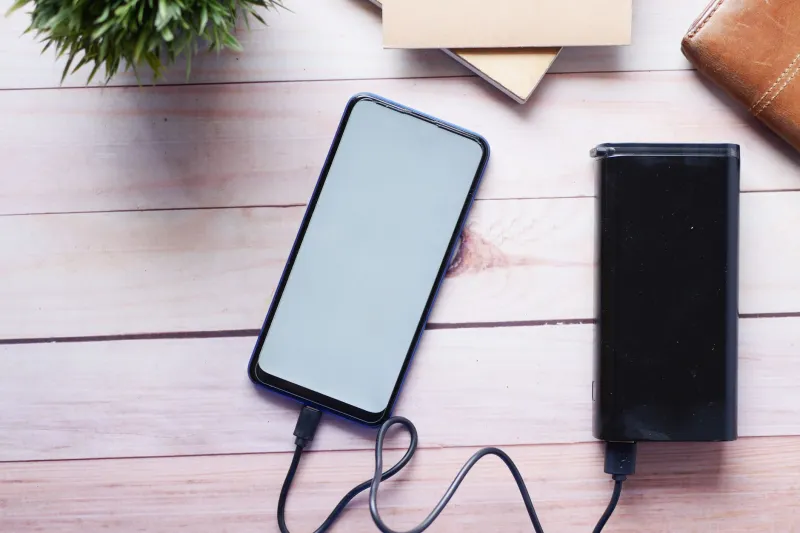
You charged your phone to 100% before you left the house. By noon, you're hunting for an outlet. Sound familiar? Most of us blame aging batteries or just chalk it up to "phones these days," but the real story is a lot more interesting — and a lot more fixable.
The truth is, a handful of apps you probably use every single day are working overtime in the background, chewing through your battery, hogging your processor, and eating up RAM even when your screen is off and your phone is sitting face-down on your desk. Let's talk about what's actually going on.
The Usual Suspects: Apps That Hit Hardest
If you've ever gone into your phone's battery settings and actually looked at the breakdown, certain names show up again and again. Facebook, Instagram, TikTok, Snapchat, and Google Maps consistently top the charts for background energy consumption across both Android and iOS devices.
Facebook has been a notorious offender for years. Even after multiple rounds of public pressure and supposed optimizations, independent tests — including data pulled from tools like Android's built-in battery historian and iOS's Screen Time analytics — show the app regularly consuming CPU cycles in the background. It's not just refreshing your feed. It's tracking location data, pre-loading video content, syncing notifications, and running ad-targeting processes you never explicitly agreed to think about.
TikTok is the newer heavyweight. Its video-first format means the app is constantly buffering content, and its algorithm runs continuously in the background to refine what it thinks you want to watch next. On a mid-range Android phone, TikTok can account for anywhere from 15% to 25% of total daily battery consumption on heavy-use days — even when you only opened it for 20 minutes.
Snapchat is a different kind of drain. The app keeps the camera API partially active in the background, which is one of the most power-intensive things any app can do. It's a design choice that makes the camera feel instant when you open it, but it costs you in battery life all day long.
What's Actually Happening Under the Hood
Here's the technical side, broken down without the jargon overload.
Your phone's processor has different performance cores — some built for heavy lifting, some for light background tasks. Well-optimized apps use the efficient cores for background work. Poorly optimized ones — or apps that are deliberately aggressive — keep waking up the high-performance cores unnecessarily. Every time that happens, your battery takes a hit.
Background App Refresh is the other big culprit. On iOS, this feature lets apps update their content even when you're not using them. On Android, the equivalent is background processes and "wakelocks" — essentially, apps that prevent your phone from entering a deep sleep state. A wakelock that fires every few minutes might not sound like much, but over 16 hours, that adds up to a significant chunk of your charge.
RAM management matters too, though it's more nuanced. Contrary to popular belief, having apps sitting in memory doesn't drain your battery much on its own. The drain comes when those apps are actively running processes — syncing data, checking for notifications, or refreshing content — rather than just sitting idle.
How to Actually Catch the Worst Offenders on Your Phone
You don't need a third-party app to investigate. Your phone already has the tools.
On iPhone: Go to Settings → Battery. Scroll down and you'll see a breakdown of which apps have used the most battery over the last 24 hours or the last 10 days. Tap "Show Activity" to see whether that usage came from screen-on time or background activity. If an app shows significant background drain relative to how little you actually use it, that's a red flag.
On Android: The path varies by manufacturer, but generally head to Settings → Battery → Battery Usage. Some Android skins (like Samsung's One UI or Google's Pixel interface) give you even more granular data, including how many times an app woke your device.
Look specifically for apps with high background activity and low foreground use. That combination means the app is doing a lot when you're not watching.
Practical Fixes That Won't Wreck Your Experience
You don't have to delete Instagram to reclaim your battery. Here's what actually works.
Turn off Background App Refresh selectively. On iOS, go to Settings → General → Background App Refresh and disable it for apps that don't need real-time updates. News apps, shopping apps, and social media are good candidates. You'll still get notifications — the app just won't be pre-loading content you haven't asked for yet.
Switch to the browser version for social apps. This sounds inconvenient, but using Facebook or Instagram through Safari or Chrome instead of the native app can dramatically reduce background drain. The web version doesn't have the same level of OS-level access.
Restrict location access. Many apps request "Always On" location permissions when "While Using" would work just fine. Go through your location settings and downgrade anything that doesn't have a genuine reason to track you constantly. GPS is one of the biggest battery consumers on your phone.
Use Battery Saver or Low Power Mode more proactively. You don't have to wait until you hit 20%. Enabling these modes during the workday — when your phone is mostly in your pocket — can stretch your charge significantly without meaningfully impacting your experience.
Check for app updates — but also watch for regressions. Developers sometimes push updates that introduce new background processes. If your battery life suddenly got worse after an app updated, that's not a coincidence. Check reviews in the App Store or Google Play; other users usually catch these issues fast.
The Bigger Picture
App developers aren't necessarily being malicious when their software drains your battery. A lot of it comes down to competitive pressure — apps that load faster, deliver notifications instantly, and feel seamless tend to retain users better. The cost of that seamlessness gets offloaded to your battery.
But as phones become more central to daily American life — handling everything from mobile payments to health tracking to work communication — understanding what's running on your device matters more than ever. Your phone's performance is a resource, and knowing which apps are spending it without your permission is the first step to taking it back.
Mobiero will keep digging into these numbers as new apps rise and fall in popularity. In the meantime, spend five minutes in your battery settings tonight. What you find might genuinely surprise you.